

Local Business Schema Generator
A local business schema generator turns the facts about your business into the structured data code that search engines read behind the scenes. When your website carries this markup, Google, Bing and AI search tools can understand your business name, address, phone number, hours, service area and reviews with far less guesswork, which is the first step toward richer local listings and a stronger presence in the map results.
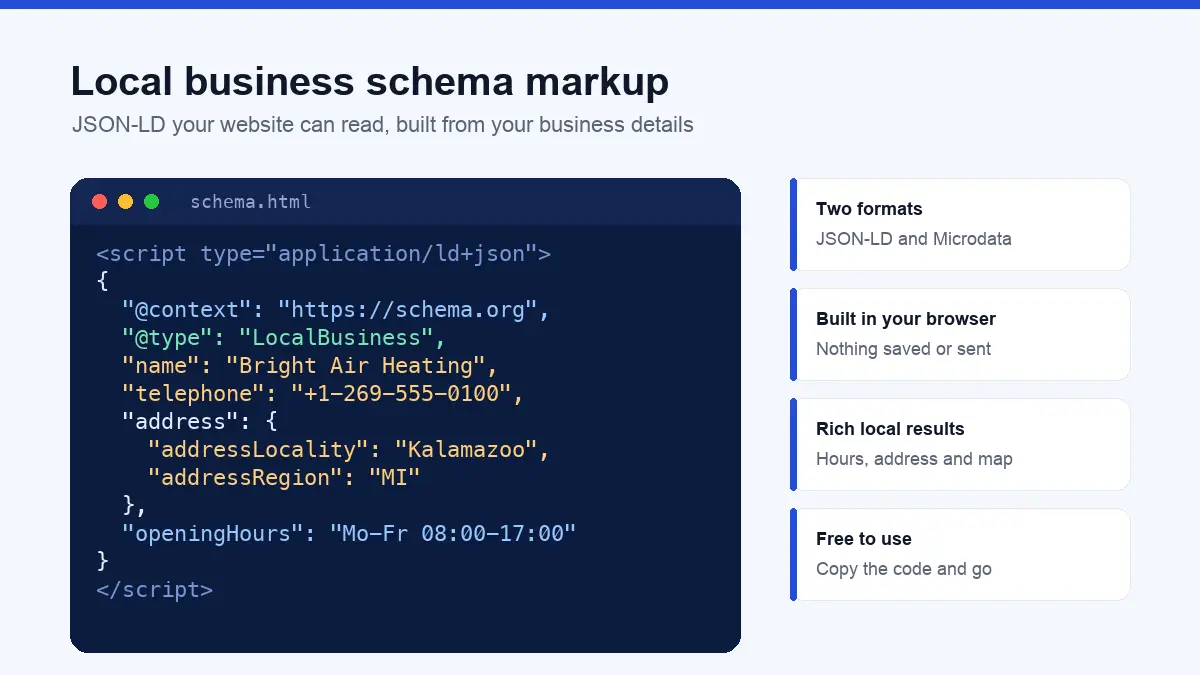
This free tool builds the markup for you in two formats at once. Choose JSON-LD, the script-based format Google recommends, or Microdata, the inline HTML format, copy the code, and paste it into your pages. Everything is generated in your browser as you type, so none of your business details are stored or sent anywhere. Fill in the fields, pick a format, and your ready-to-use code appears instantly.
Clear, accurate structured data pairs well with a complete public profile. Once your markup is live, you can widen your reach by adding your company to a free USA business listing and appearing across the local business directory, so customers find the same consistent details in more than one place.
How to Use This Local Business Schema Generator
The generator is built to be quick for a business owner and precise enough for a developer. You do not need to understand the code to produce valid markup; you only need the real details of your business. Work through the fields from top to bottom, and the preview updates on every keystroke.
- Pick the business type that matches your company most closely, such as HVAC business, dentist, law firm or restaurant, so the markup uses the right schema.org category.
- Enter your business name exactly as it appears on your Google Business Profile, then add your website URL and phone number in a format customers can dial.
- Add your address, or tick the service-area option if you travel to customers and hide your street address, and list the cities or regions you cover.
- Set your opening hours for each day, or mark the business open around the clock, so the markup reflects when customers can reach you.
- Paste your profile links, one per line, into the sameAs field to connect your website to your social and listing pages.
- Choose JSON-LD or Microdata, press Copy code, and add the markup to your site, then confirm it with a structured data testing tool.
If a field does not apply to your business, leave it blank and the tool simply leaves it out of the code. The short notes above the output flag anything important you still need, such as a missing business name or website, so you can finish a complete block before you publish it.
JSON-LD and Microdata: Which Format to Choose
This generator produces both formats because websites are built in different ways, and the right choice depends on how your pages are put together. Both describe the same business to search engines; they just sit in different places in your HTML.
JSON-LD is a block of structured data placed inside a script tag, usually in the head of the page. It keeps the markup separate from the visible content, which makes it easy to add, edit and remove without touching your design. In its local business structured data guidance, Google names JSON-LD as its preferred format, and it is the simplest option for most WordPress sites, page builders and tag managers.
Microdata is written directly into the visible HTML using itemscope and itemprop attributes wrapped around the text a visitor already sees. It suits older templates, hand-coded pages or situations where you want the data tied to the exact elements on the page. The result is the same understanding of your business, so pick the format that fits your workflow rather than worrying that one ranks better than the other.
What Each Field in the Generator Means
Every field maps to a recognized schema.org property, so the code you copy follows the published vocabulary that search engines rely on. Knowing what each one feeds helps you fill them in with confidence.
- Business type sets the schema.org category, which tells search engines whether you are a plumber, a cafe, an accountant or a general local business.
- Name, website and phone form the core identity of your business and should match the details on your other profiles word for word.
- Logo or photo URL adds an image property, giving search engines a picture to associate with your brand in rich results.
- Address and country produce a PostalAddress block, while the service-area switch removes the street line for businesses that visit customers instead.
- Latitude and longitude create a GeoCoordinates block that pins your exact location for maps and distance-based searches.
- Opening hours and sameAs links complete the picture, showing when you are open and connecting your site to the profiles that confirm who you are.
Who Uses This Tool
Structured data used to be the preserve of developers, but a generator removes the technical barrier. Anyone responsible for how a local business appears online can produce correct markup in a few minutes.
- Local business owners who manage their own website and want the same rich listings they see from larger competitors.
- Freelance web designers and small agencies adding structured data to client sites without writing it by hand each time.
- SEO specialists who need clean, valid markup to support local ranking work and to pass structured data tests.
- Marketing managers at multi-location brands who need a repeatable way to mark up every branch with consistent details.
- Developers who want a fast starting block they can refine, rather than typing every property from memory.
- Virtual assistants and office staff keeping a company’s online details accurate across its website and directory profiles.
Use Cases With Examples
The same tool handles very different businesses because the schema.org vocabulary covers hundreds of local categories. A few real examples show how the fields adapt.
A heating and cooling company that visits homes
An HVAC contractor with no shopfront ticks the service-area option, hides the street address, and lists the towns it covers. The markup describes an HVACBusiness with a phone number, hours and the service region, so homeowners searching for repair nearby see an accurate, complete listing.
A hair salon on a busy high street
A salon chooses the HairSalon type, enters its full address, latitude and longitude, and sets different hours for weekdays and weekends. Adding the Google Business Profile and Instagram links to the sameAs field helps search engines connect the booking page, the map pin and the social account to one business.
A law firm with several practice areas
A firm selects Attorney, adds its office address and a short description of the work it does, and includes a price range to set expectations. Because the details match the firm’s other profiles exactly, the markup reinforces trust rather than introducing conflicting information.
A family restaurant taking reservations
A restaurant picks the Restaurant type, lists daily opening hours, adds a photo URL and a price band, and links its reservation and review pages. The structured data gives search engines the facts they need to display an informative local result for hungry searchers nearby.
How Schema Markup Helps You Show Up in Local Search
Structured data does not guarantee a top position, but it removes ambiguity, and search engines reward clarity. When your markup confirms exactly who you are and where you operate, your business becomes easier to match to the right searches.
- It supports eligibility for rich results, where your hours, rating and contact details can appear directly in the search listing.
- It strengthens the signals behind the local map pack, where consistent name, address and phone data matter most.
- It helps search engines place your business on maps accurately through precise coordinates and a verified address.
- It feeds knowledge panels, giving search engines a reliable source for the facts shown beside your brand.
- It clarifies your service area, so searches that include a nearby town are matched to the places you actually cover.
- It connects your website to your other profiles, reducing the chance that conflicting details weaken your visibility.
Structured Data and Your Google Business Profile
Schema markup on your website and your Google Business Profile are two different things that support each other. The profile is the listing Google hosts and shows in the map results, while the markup lives on your own site and describes your business in a language search engines read. Neither replaces the other, and the strongest local presence uses both.
Your Google Business Profile is where you confirm ownership, collect reviews and appear in the local pack. The structured data on your site backs that listing up with matching facts under your own control, which is useful because you own the website even when platforms change. When the name, address, phone number and hours agree across both, search engines see a consistent story and have fewer reasons to doubt any single source.
Think of the markup as the version of your business facts that you hold directly. It travels with your site, works across every search engine rather than one platform, and keeps stating your details clearly even on pages a profile listing never touches, such as individual service or location pages.
Checking Your Markup Before You Rely On It
Valid code is only the start; you also want proof that search engines read it the way you intend. A quick test after publishing catches formatting slips and confirms that your business block is recognized, and it takes only a few minutes.
- Paste the page URL or the code itself into a structured data testing or rich results tool to confirm the business type is detected.
- Check that the name, address, phone number and hours in the test output exactly match what you entered in the generator.
- Look for warnings as well as errors, since missing recommended fields can limit how your listing appears.
- Test the live page once the markup is published, not just the draft, so you are checking what visitors and crawlers actually see.
- Monitor your search console reports over the following weeks for any structured data issues the search engine flags.
- Re-test whenever you change your details, so a quick edit never silently breaks a block you set up months ago.
Where to Add the Code on Your Website
Once you have copied the markup, placement is straightforward, and the best spot depends on your platform. JSON-LD can go almost anywhere in the page, while Microdata belongs around the matching visible content.
- On WordPress, paste the JSON-LD block into a header or body code area using a headers-and-footers plugin, or your theme’s custom code field.
- With a page builder, use a custom HTML or code widget on the page where the business details appear.
- Through Google Tag Manager, add the JSON-LD as a custom HTML tag that fires on the pages you want marked up.
- On a hand-coded site, drop the JSON-LD into the head section, or wrap your visible address block with the Microdata version.
- For a single-location business, your home page and contact page are the natural places for the markup.
- After adding it, run the page through a structured data test to confirm the business block is detected without errors.
Keep one business block per physical location. If you run several branches, generate a separate block for each one using its own address and hours rather than listing them all in a single entry.
Common Schema Mistakes and How to Avoid Them
Most structured data problems come from mismatched or exaggerated details rather than broken code. A generator produces valid markup, so your job is to keep the facts honest and consistent.
- Details that do not match your visible page or your Google Business Profile, which search engines treat as a warning sign.
- Marking up a business type that does not fit, such as labelling a service company as a store, which confuses the listing.
- Adding review or rating markup you cannot back up on the page, which breaks search engine guidelines.
- Copying one block to every branch, so several locations share the same address and hours by mistake.
- Leaving an old block in place after you move or change your phone number, so the code and reality drift apart.
- Forgetting to test the page after publishing, which lets small formatting errors go unnoticed for months.
How Schema Markup and AI Search Work Together
Search is no longer only a list of blue links. AI overviews, voice assistants and chat-based search read the same structured data to answer questions directly, and clear markup makes your business easier for them to quote.
When someone asks an assistant for a nearby plumber open now, the systems behind that answer need machine-readable facts: the business category, the hours, the location and the contact details. Structured data delivers exactly those facts in a format built for machines, so a business with accurate markup is more likely to be surfaced in these newer answer formats than one that leaves search engines to interpret plain text.
The same consistency that helps traditional rankings helps here too. Matching details across your website, your directory listings and your social profiles gives AI systems several agreeing sources, which raises their confidence in showing your business. Markup is not a trick for AI search; it is simply the clearest way to state the facts, and clear facts travel well across every kind of search.
Keeping Your Business Details Consistent Everywhere
Schema markup works best as part of a consistent online presence rather than in isolation. The name, address, phone number and hours in your code should match what appears everywhere else your business is listed, because conflicting information weakens the trust that local search depends on.
Start by deciding the exact wording of your business name, the format of your phone number and your official address, then use them without variation. Apply the same details in your markup, on your free business tools profile, and across the directories where customers look for you. A good next step is to claim a free business listing so your verified details appear in a trusted public directory alongside the markup on your own site.
Review your structured data whenever something changes, such as new hours, a move or an added service. A few minutes in the generator keeps your code current, and consistent details across your site and the wider USA business directory give both customers and search engines one clear, dependable picture of your business.
Frequently Asked Questions
What is a local business schema generator?
It is a free tool that turns your business details into schema.org structured data code. Search engines read that code to understand your name, address, phone, hours and service area, which helps your business appear correctly in local search and rich results.
What is the difference between JSON-LD and Microdata?
JSON-LD is a separate block of code placed in a script tag, usually in the page head, and kept apart from your visible content. Microdata is written into the visible HTML using itemscope and itemprop attributes. Both describe the same business to search engines.
Which format should I use?
JSON-LD suits most websites and is the format Google prefers, so it is the best default. Choose Microdata when you want the data tied to existing visible elements or you are working with an older hand-coded template. This tool builds both, so you can pick either.
Where do I add the schema code on my website?
Paste JSON-LD into the page head using a headers plugin, a theme code field, a custom HTML block or Google Tag Manager. Microdata is wrapped around the matching visible address and contact details. Add one block per physical location.
Is the schema generator free and private?
Yes. The tool is free to use, and the code is built in your browser as you type. Nothing you enter is stored on a server or sent anywhere, so your business details stay with you.
Do I need coding skills to use it?
No. You only fill in the real details of your business, such as name, address, phone and hours, and the tool writes valid markup for you. Copy the finished code and paste it into your site.
Will schema markup improve my Google ranking?
Schema markup does not guarantee a higher position, but it removes ambiguity about who you are and where you operate. That clarity supports eligibility for rich results and strengthens the local signals search engines rely on, which can help your visibility.
Can I use it for a service-area business with no storefront?
Yes. Tick the service-area option to leave out the street address, then list the cities or regions you cover. The markup will describe your business and the areas you serve without publishing a location you do not want shown.
